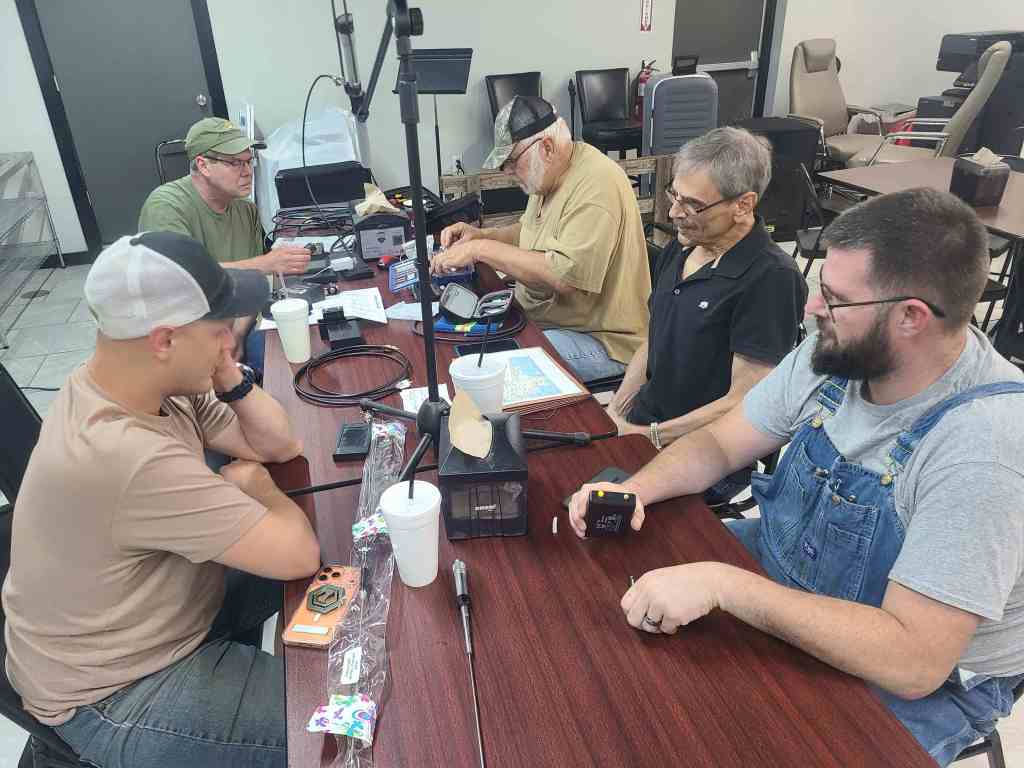
Attending were (Left to Right) Kenny KJ5EKW, Jon W5JCN, Mike KI5YX, Tom WA5MAZ, and newly licensed Ham Anthony KJ5PUZ who has a Tiny SA spectrum analyzer in his hand, a similar and much more fun to use device that uses the same basic parts as a VNA, a wideband sweep generator and matched receiver. 2 of the four VNA devices brought that night are visible on the table. It’s hard to measure a 40M dipole inside a burger joint so Kenny EKW brought a homemade 220 J-Pole (out of sight above the tripod on the table), and there were a couple other dual band (2M and 440) antennas there also.
We had four (4) VNAs to look at Thurs the 28th. New users will find they are a little difficult to set up, the Chinese word for freq apparently also translates to ‘Stimulus.’ The good news is, once you have it set to show SWR on a particular band, you can save that setup and bring it back easily the next time. Kenny EKW said you can also (before you turn it off) set it to ‘Remember State’ by pressing buttons CONFIG, then EXPERT SETTINGS, and REMEMBERS TATE (that’s not MY typo, that’s the way it’s shown on the Logic Diagram that comes with the VNA).
On first turn on, you get four (4) different colored traces in 4 colors. Step 1 is delete three of them to leave the SWR chart, and then set freq (I mean stimulus – start and stop freqs) for the band you want.
ZQG also brought in the MFJ, demonstrating it on a 2M/440 dual band antenna to Anthony KJ5PUZ (who is reealy new – only 1 radio so far). The MFJ features SWR, R, X, and Z shown all at once for a particular freq, but you have to make your own chart by setting several freqs and writing down the result for each. It also measures other parameters such as Coax Loss by pushing one button.
The MFJ SWR analyzer is easier to use at first, as they say, a much easier learning curve, but it costs $350 new so wouldn’t you like to know how to use the cheaper (and quicker to display a chart) VNA.
 Radio Society of Greater Bixby
Leave a comment